> For the complete documentation index, see [llms.txt](https://malwaresourcecode.com/home/llms.txt). Markdown versions of documentation pages are available by appending `.md` to page URLs; this page is available as [Markdown](https://malwaresourcecode.com/home/my-projects/write-ups/a-quick-guide-to-defining-malware-with-usd0-python3-and-windows.md).
# A Quick Guide to Defining Malware with $0, Python3, and Windows
To be blunt: if you've got a bunch of binaries that you know is malware, or suspect is malware, and want to label it appropriately but don't have the ability to get an expensive VirusTotal license (or they don't want to lend you a researcher API key), don't have the ability (or skillset) to setup something like [Polish CERT MWDB](https://github.com/CERT-Polska/mwdb-core) or [Canadian CCCS AssembyLine](https://www.cyber.gc.ca/en/tools-services/assemblyline), or any other reason not listed here, then this tutorial will show you how to ball out on a budget.
Requirements: \
\- Windows (yes, you read that correctly) \
\- Python3 \
\- Malware
Windows Defender comes equipt with a command line interface designed for Enterprise Users (maybe? no idea, just making that up) that allows anyone to do a quick custom scan on a file. The binary is (usually) located in:
```
C:\Program Files\Windows Defender\MpCmdRun.exe
```
MSDN offers a [pretty good guide](https://learn.microsoft.com/en-us/defender-endpoint/command-line-arguments-microsoft-defender-antivirus) on how to use the command line interface. If you don't want to read, the tl;dr is the the following command line is absolute gold:
```
MpCmdRun.exe -Scan -ScanType 3 -File "{full_file_path}" -DisableRemediation
```
This will scan a file, print the results onto the console, and do nothing thanks to the DisableRemediation flag. It looks like this:
The caveat to this command line argument is the -File flag requires the full path to the file you want to scan.
Anyway, here is some Python 3 code that accepts a directory as an argument. It will programmatically loop through a directory, scan the file, get the output from MpCmdRun.exe, then display the result on the console using a file path friendly definition (more on that later).
```python
import subprocess
import os
import argparse
import hashlib
def update_defender_signatures():
"""Updates the Defender virus definitions to ensure the latest signatures are used."""
try:
command = r'"C:\Program Files\Windows Defender\MpCmdRun.exe" -SignatureUpdate'
result = subprocess.run(command, capture_output=True, text=True, shell=True)
print(result.stdout) # Directly print the output from the command
print(result.stderr) # Directly print any errors from the command
except Exception as e:
print(f"An error occurred during signature update: {e}")
def calculate_sha256(file_path):
"""Calculates and returns the SHA-256 hash of a file."""
sha256_hash = hashlib.sha256()
try:
with open(file_path, "rb") as f:
# Read the file in chunks to avoid memory issues with large files
for byte_block in iter(lambda: f.read(4096), b""):
sha256_hash.update(byte_block)
return sha256_hash.hexdigest()
except Exception as e:
print(f"Error calculating SHA-256 for {file_path}: {e}")
return None
def extract_threat_name(output, file_hash):
"""Extracts and prints the full threat name from the Defender output, replacing special characters."""
lines = output.splitlines()
threat_section_found = False
threat_name_found = False
for line in lines:
if "LIST OF DETECTED THREATS" in line:
threat_section_found = True # Found the section with the threat list
continue # Move to the next line after detecting the section
if threat_section_found and not threat_name_found:
if "Threat" in line and ":" in line:
# Capture everything after the first colon to ensure the full threat name
threat_name = line.split(":", 1)[1].strip() # Get the threat name
# Replace :, /, and ! with a period
threat_name = threat_name.replace(":", ".").replace("/", ".").replace("!", ".")
print(f"Threat detected: {threat_name}-{file_hash}")
threat_name_found = True
break
if not threat_name_found:
print(f"No threat detected for file with hash {file_hash}.")
def scan_file_with_defender(file_path):
"""Scans a single file using Windows Defender."""
# Calculate the SHA-256 hash of the file
file_hash = calculate_sha256(file_path)
if not file_hash:
return # If hash calculation failed, skip this file
# Define the command to run MpCmdRun.exe to scan the specific file
command = fr'"C:\Program Files\Windows Defender\MpCmdRun.exe" -Scan -ScanType 3 -File "{file_path}" -DisableRemediation'
try:
# Run the command and capture output, using shell=True
result = subprocess.run(command, capture_output=True, text=True, shell=True)
# Parse the result.stdout to extract and print the threat name along with the file hash
extract_threat_name(result.stdout, file_hash)
except Exception as e:
print(f"An error occurred while scanning {file_path}: {e}")
def scan_directory_with_defender(directory_path):
"""Scans all files in a directory using Windows Defender."""
# Resolve the full path of the directory
directory_path = os.path.abspath(directory_path)
# Check if the directory exists
if not os.path.isdir(directory_path):
print(f"Directory not found: {directory_path}")
return
# First update signatures
update_defender_signatures()
# Loop through all files in the directory and scan each one
for root, dirs, files in os.walk(directory_path):
for file in files:
file_path = os.path.join(root, file)
scan_file_with_defender(file_path)
if __name__ == "__main__":
# Parse the command line argument
parser = argparse.ArgumentParser(description="Scan a file or a directory using Windows Defender.")
parser.add_argument("directory_path", help="The path to the directory you want to scan.")
args = parser.parse_args()
scan_directory_with_defender(args.directory_path)
```
When you run it against a directory containing malware, the output will look like this:
Cool beans! If you want it to rename the files using the path friendly output you can use the following code:
```python
import subprocess
import os
import argparse
import hashlib
def update_defender_signatures():
"""Updates the Defender virus definitions to ensure the latest signatures are used."""
try:
command = r'"C:\Program Files\Windows Defender\MpCmdRun.exe" -SignatureUpdate'
result = subprocess.run(command, capture_output=True, text=True, shell=True)
print(result.stdout) # Directly print the output from the command
print(result.stderr) # Directly print any errors from the command
except Exception as e:
print(f"An error occurred during signature update: {e}")
def calculate_sha256(file_path):
"""Calculates and returns the SHA-256 hash of a file."""
sha256_hash = hashlib.sha256()
try:
with open(file_path, "rb") as f:
# Read the file in chunks to avoid memory issues with large files
for byte_block in iter(lambda: f.read(4096), b""):
sha256_hash.update(byte_block)
return sha256_hash.hexdigest()
except Exception as e:
print(f"Error calculating SHA-256 for {file_path}: {e}")
return None
def extract_threat_name(output, file_hash):
"""Extracts and returns the full threat name from the Defender output, replacing special characters."""
lines = output.splitlines()
threat_section_found = False
threat_name_found = False
for line in lines:
if "LIST OF DETECTED THREATS" in line:
threat_section_found = True # Found the section with the threat list
continue # Move to the next line after detecting the section
if threat_section_found and not threat_name_found:
if "Threat" in line and ":" in line:
# Capture everything after the first colon to ensure the full threat name
threat_name = line.split(":", 1)[1].strip() # Get the threat name
# Replace :, /, and ! with a period
threat_name = threat_name.replace(":", ".").replace("/", ".").replace("!", ".")
return f"{threat_name}-{file_hash}"
return f"NoThreatDetected-{file_hash}"
def scan_file_with_defender(file_path):
"""Scans a single file using Windows Defender and renames it based on the threat and hash."""
# Calculate the SHA-256 hash of the file
file_hash = calculate_sha256(file_path)
if not file_hash:
return # If hash calculation failed, skip this file
# Define the command to run MpCmdRun.exe to scan the specific file
command = fr'"C:\Program Files\Windows Defender\MpCmdRun.exe" -Scan -ScanType 3 -File "{file_path}" -DisableRemediation'
try:
# Run the command and capture output, using shell=True
result = subprocess.run(command, capture_output=True, text=True, shell=True)
# Parse the result.stdout to extract the threat name along with the file hash
new_file_name = extract_threat_name(result.stdout, file_hash)
# Rename the file with the new name
file_directory = os.path.dirname(file_path)
file_extension = os.path.splitext(file_path)[1] # Keep the original file extension
new_file_path = os.path.join(file_directory, new_file_name + file_extension)
os.rename(file_path, new_file_path)
print(f"File renamed to: {new_file_path}")
except Exception as e:
print(f"An error occurred while scanning {file_path}: {e}")
def scan_directory_with_defender(directory_path):
"""Scans all files in a directory using Windows Defender."""
# Resolve the full path of the directory
directory_path = os.path.abspath(directory_path)
# Check if the directory exists
if not os.path.isdir(directory_path):
print(f"Directory not found: {directory_path}")
return
# First update signatures
update_defender_signatures()
# Loop through all files in the directory and scan each one
for root, dirs, files in os.walk(directory_path):
for file in files:
file_path = os.path.join(root, file)
scan_file_with_defender(file_path)
if __name__ == "__main__":
# Parse the command line argument
parser = argparse.ArgumentParser(description="Scan a file or a directory using Windows Defender and rename files based on detected threats.")
parser.add_argument("directory_path", help="The path to the directory you want to scan.")
args = parser.parse_args()
scan_directory_with_defender(args.directory_path)
```
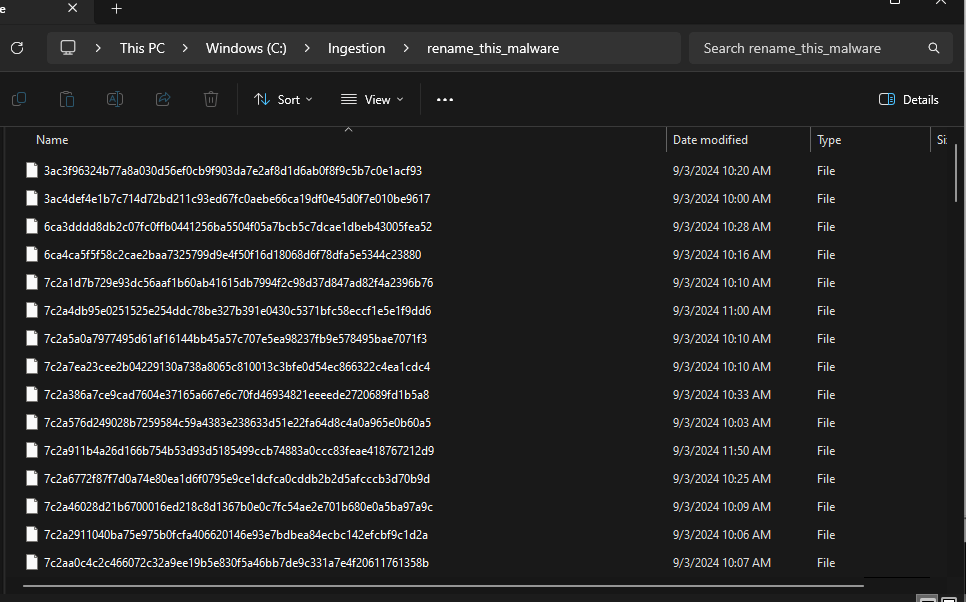
Before the script is ran, this is a picture of a directory named "rename\_this\_malware"
This is the output on the console from the script:
Here is the new file contents in the directory:
Now we ballin' on a budget.
-smelly